Private transcription · iPhone and Mac
Every word of the conversation, written down. On your own device.
Sessa records a therapy session, an interview, a meeting or a lecture, or takes a recording you already have, and writes out who said what. It is made for conversations that are not yours alone to share: the work is done on your own iPhone or Mac, with no account, and the draft is yours to check and correct.
- iPhone and Mac
- Free, with no account
- Seven languages
- Works without a connection
On-device transcription
Transcribed on your own device. Never sent to third-party servers or transcription engines to be processed.
The speech models run on the chip of your iPhone or Mac. No other company hears a recording or processes it, and neither do we.
- No outside transcription service
- No audio uploaded to be processed
- Works in airplane mode
-
Private by construction
The recording is transcribed by software running on your own iPhone or Mac. No recording is sent to a service to be listened to, and what is stored is encrypted with a key only your devices hold.
-
Who said what
Sessa tells the speakers apart, and can mark your own voice if you record a short sample of it, so the transcript reads as a conversation and not as one block of text.
-
You have the last word
Every transcript starts as a draft. Sessa points to the parts it is unsure about; you listen, correct and approve.
What people record
For conversations that are not yours alone to share
A client, a participant, a colleague, a source: someone trusted you with what they said. Sessa keeps the work of writing it down on your own device.
-
Therapy sessions and supervision
Listen instead of taking notes, and bring the exact words to supervision. A therapy mode adds client folders shown by initials, an approve step and keeping periods you set.
Recording a session for supervision -
Research interviews
A word-for-word draft with the speakers told apart, made without sending a participant’s voice to a transcription service.
Transcribing interviews on your own device -
Meetings and calls on the Mac
Sessa for Mac records your microphone together with the Mac’s sound, so both sides of a call in any app on your Mac are in the transcript. No bot joins the call.
-
Lectures and seminars
Record a lecture, or import a recording you already have, and read it back with the speakers told apart.
Telling the people you record, and getting their consent, is your responsibility. The rules differ by place and profession, and Sessa gives no legal advice.
How it works
From a conversation to a transcript you can trust
Four quiet steps. None of them needs a connection once the app is set up.
-
Record, or bring a recording
Put the phone where it usually sits and start, or record on the Mac. You can also import an audio or video file you already have.
-
Sessa writes the draft
When the conversation ends, the device transcribes it and separates the speakers. It takes minutes, and longer for long recordings: about a quarter of the recording’s length on a recent iPhone. It carries on if you lock the phone.
-
Review what matters
Parts where the speech overlapped or the speaker is uncertain are marked. Jump between them, listen again, fix a word, name a speaker.
-
Approve, export or delete
A checked transcript is yours to keep or share as a file. The recording itself can be deleted on a schedule you set.
Privacy
Only you can open what you record
Everything is transcribed on your own devices. Your recordings and transcripts stay on the device unless you turn on iCloud sync. If you do, they are encrypted on your device before they are stored in your iCloud, with a key that only your devices hold. Codonic never receives them, and Apple cannot read them.
-
No account
No sign-up, no email, no password. You open the app and it works.
-
No cloud processing
Transcription and speaker separation happen on the device. No service ever listens to a recording.
-
No analytics
The app does not measure what you do, and it carries no advertising or tracking code.
-
Encrypted and locked
Records are stored encrypted. On an iPhone the key exists only while the phone has a passcode, and the app opens with Face ID or that passcode.
The only times the app goes online
- To download the speech models, once per language, from our own server. After that, the app works without a network.
- To send a diagnostics report, and only when you choose to send one. You can read it first. It holds technical details and any note you add, never recordings or transcripts.
- If you turn on iCloud sync, to keep your library in step across your devices through your own iCloud. What it sends is encrypted on the device first, and none of it reaches us.
Across your devices
One private library on your iPhone and Mac
Transcription stays on your own devices. Sync between them is your choice, and so is how much of the therapy mode you use.
-
iCloud sync, if you want it
Off until you turn it on. Your library stays the same on your iPhone and Mac and can be restored on a new device. It is encrypted on the device first, with a key only your devices hold, and stored in your own iCloud. Patient files sync too.
-
Which devices transcribe
Transcribing needs a device with enough memory and speed, and Sessa checks this on each device. One below the line can still record, read and correct, and with sync on, a Mac can transcribe what your other devices record.
-
General use, or the therapy mode
In general use Sessa has plain folders for interviews, meetings and lectures. The therapy features, with client folders and clinical steps, are one switch away.
Sessa for Mac
Meetings and calls, transcribed on the Mac itself
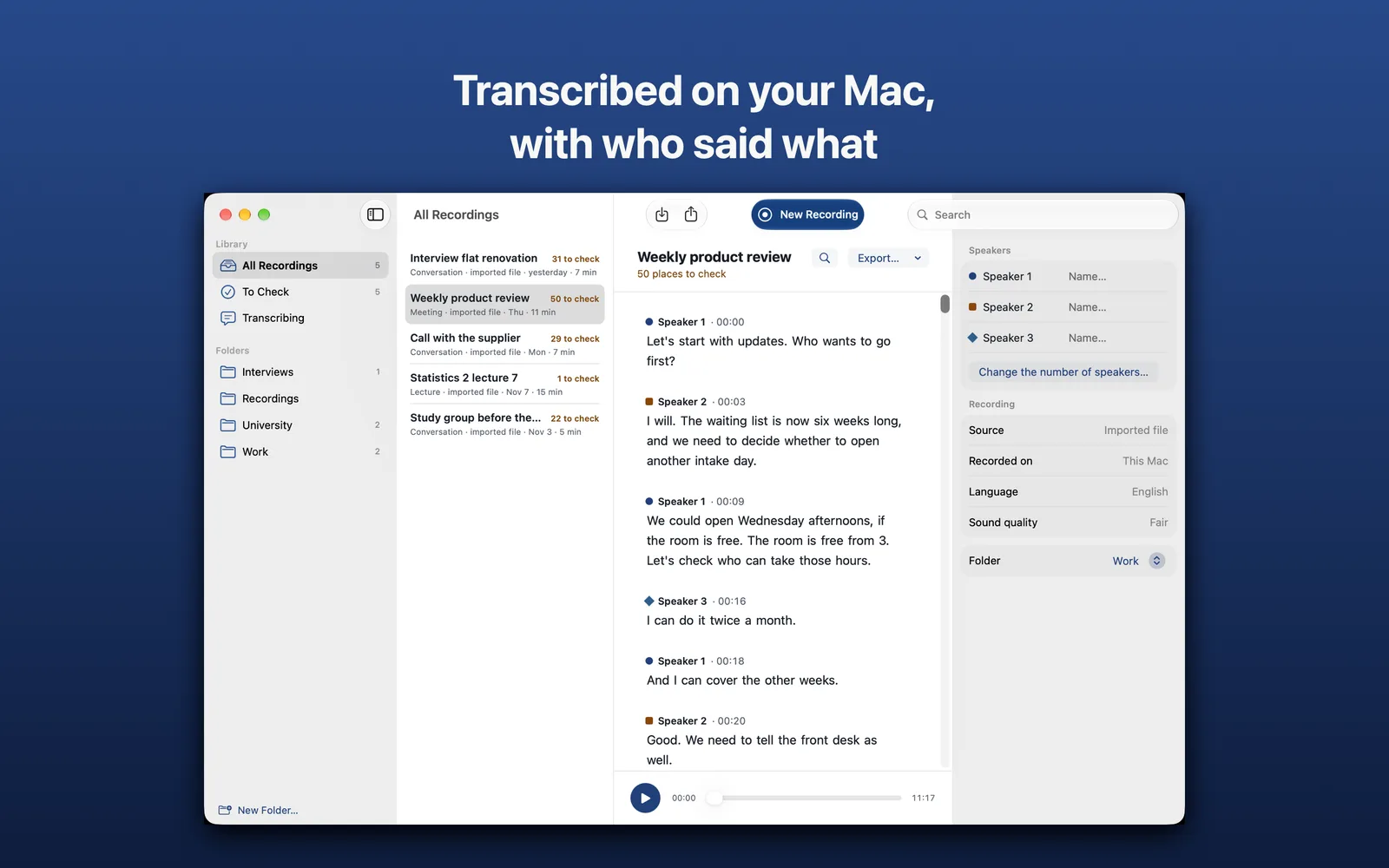
The same app and the same private library, on macOS 27 or later. Like the iPhone app, it is free and needs no account.
Download Sessa for Mac Free. A Mac with Apple silicon, macOS 27 or later. Notarized by Apple. Also on the Mac App Store.
-
Both sides of a call
Sessa records your microphone together with the Mac’s sound, as two tracks, so a call in any app on your Mac is captured with both sides.
-
Sound only, and no bot
Sessa never records the screen, and nothing joins the call on your behalf. It records only while a recording you started is running.
-
Bring the files you have
Drag audio files, or video files for their sound, onto the window. They are transcribed on the Mac, with the speakers told apart.
Tell the people on the call that you are recording. Getting their consent is your responsibility, the rules differ by place and profession, and Sessa cannot tell you whether a recording is allowed.
For your practice
A therapy mode, built around the way a practice works
Turn it on and Sessa knows the difference between a session, a team meeting and a lecture, and treats each accordingly.
-
A folder for every client
Each session is filed under the client, newest first, with what is still to check and when each recording will be deleted.
-
Recordings do not pile up
Choose how long a recording is kept after you approve its transcript, to fit your own rules. When the time is up, Sessa deletes it and keeps the text.
-
Discreet by default
Lists show initials, not full names, unless you decide otherwise. The app locks itself when you leave it.
-
A record of what happened
Approvals, exports and deletions are noted in an activity log kept with your records, encrypted like them.
-
Sessions, meetings, lectures
Individual, couple and family sessions; staff meetings and group supervision; lectures and study days, each with its own way of telling speakers apart.
-
One button to erase it all
Delete everything on the phone, including your voice sample, whenever you need to. It cannot be undone, by you or by us.
You set the keeping periods to your own rules: how long records must be kept differs by country and profession. Sessa is not legal advice. Your professional and legal duties, and the consent of the people you record, remain yours.
Questions
Good questions to ask of any recorder
Can anyone else see what I record?
No. Recordings, transcripts and names are transcribed on your own devices and stored encrypted, with a key only your devices hold. Without iCloud sync they stay on the device. If you turn sync on, they are encrypted on the device before they are stored in your own iCloud: we never receive them, and Apple cannot read them.
Does Sessa need an internet connection?
Only during setup, to download the speech models for the language you record in. After that it records and transcribes with no connection at all, even in airplane mode.
Which languages does it transcribe?
Seven: Arabic, English, French, German, Hebrew, Russian and Spanish. You choose the spoken language for each recording. English and Hebrew are the two we have tried the most. The others run on a general multilingual model and we have tried them less, so check those drafts with extra care. The app’s own menus are in English and Hebrew.
How long does transcribing take?
Minutes, and longer for long recordings: about a quarter of the recording’s length on a recent iPhone. A warm or older phone takes longer. The text appears after the recording ends, not while people speak.
How accurate is the transcript?
It is a careful draft, not a finished record. Accuracy depends on the room, the microphone distance and how people speak. Sessa marks the parts that deserve a second listen, and nothing counts as final until you approve it.
What happens if I lose my phone?
Nobody can read the records without your passcode. Without iCloud sync there is no copy outside the phone, so export what you need to keep. With iCloud sync, your library comes back on a new iPhone or Mac through iCloud Keychain or the recovery key you keep. Patient files come back with it.
Does Sessa take care of consent for me?
No. Telling the people you record and obtaining their consent, and meeting your professional and legal duties, is your responsibility. The rules differ by place and profession. Sessa does not keep consent forms, so keep them the way you already do. The app gives no legal advice.
Does it write summaries or clinical notes?
No. Sessa writes down what was said and who said it. It does not summarise, interpret or diagnose, and it is not a medical device.
How much does it cost?
Sessa is free on the App Store, with no account, no sign-up and no advertising.
Who makes Sessa, and why is it free?
Sessa is made by Codonic. It is free, with no ads, no account and no data collected.
Where can I get it?
Sessa is on the App Store, for iPhone on iOS 27 or later and for Mac on macOS 27 or later: tap “Download on the App Store” on this page, or search for Sessa in the App Store. Sessa for Mac, for a Mac with Apple silicon, can also be downloaded directly from this page. It does not run on iPad, Android or Windows.
A quieter way to keep the record
Sessa is free on the App Store, for iPhone on iOS 27 or later and Mac on macOS 27 or later. The Mac app can also be downloaded directly from this page.